
Proxmox VE + NVIDIA = 🚀
Starting with NVIDIA vGPU 18 Proxmox VE entered the list of supported hypervisors. Running GPUs, and even vGPUs, have been possible for a while before this announcement, however it involved PCIe passthrough of the whole GPU resulting in only a single VM being able to take advantage of GPU acceleration. Or when running vGPU it involves some, maybe not fully legal, modifications of the drivers and firmware. All being things a sane enterprise user would never do.
What is vGPU, what does it do?
vGPU allows splitting a single GPU into multiple smaller GPUs, and can be compared to what we are already used to when we split a physical CPU into many vCPUs when doing virtualization.
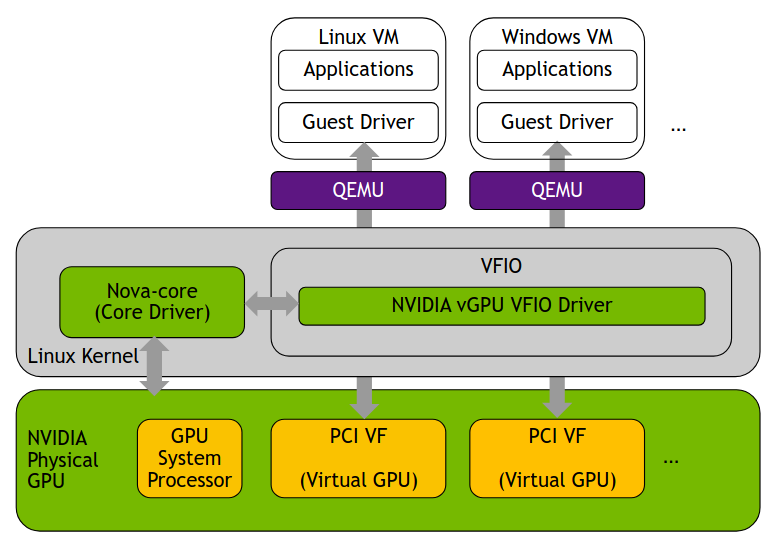
Since Proxmox VE uses KVM under the hood we can look at the architecture for vGPU on KVM to get a brief view on what actually happens. The solution is built on SR-IOV with the vGPUs being presented as VFs(Virtual Functions). This way partitioning out chunks of the GPU, presenting it to the guest as a smaller GPU. VFIO is a driver that lives inside the kernel and provides a framework for exposing direct device access. NVIDIA VFIO driver sits on top of this interacting with with the core driver responsible for managing the hardware. The result is a fully working vGPU solution capable of supporting live migration, heterogeneous and homogeneous GPU deployments where the making the solution highly flexible.
The question is, does Proxmox VE support everything?
Proxmox VE
Implementing vGPU in Proxmox VE, thanks to the tools provided by Proxmox, is a piece of cake. The official documentation can be found here NVIDIA vGPU on ProxmoxVE. At some stages it could be a bit more verbose, but overall you can follow it almost step by step and the end result will be a fully working vGPU. The NVIDIA docs for vGPU on KVM are also insanely good vGPU on KVM. They on the other hand are a bit verbose at times, making it hard to find what you are looking for. But they do come in handy when you want to customize the GPU behavior and understand what goes on under the hood.
As mentioned before KVM and the NVIDIA vGPU driver for KVM implements support for live migration. If you have two hosts with NVIDIA GPUs capable of providing the same vGPU profile it is possible to live migrate a vGPU enabled guest between these hosts. The function was implemented in Proxmox VE 9.1 and is still considered a experimental feature, so use it with care.
The tests I have done so far have all ended with good results. During a live migration the guest will experience a brief lag, I’ve seen 400-900ms so far, but no crashes or restarts have happend. Hopefully the function will graduate in 9.2.
Overall there is nothing bad to say about vGPU on Proxmox VE, only good things. Thanks to the partnership with NVIDIA the implementation has been solid and will hopefully stay that way. If you have vGPU licenses and a support agreement with NVIDIA you even have support from Proxmox, provided you have bought Proxmox VE licenses.
Now ima go watch my “The Coolest 4K Video ULTRA HD 240FPS | Dolby Vision HDR 4K” on my GPU accelerated Windows Server 2025. Might spend another evening writing a how to setup vgpu on proxmox guide including the parts that I felt are missing from the official documentation. ツ